
RIP and EIGRP Configuration on same network

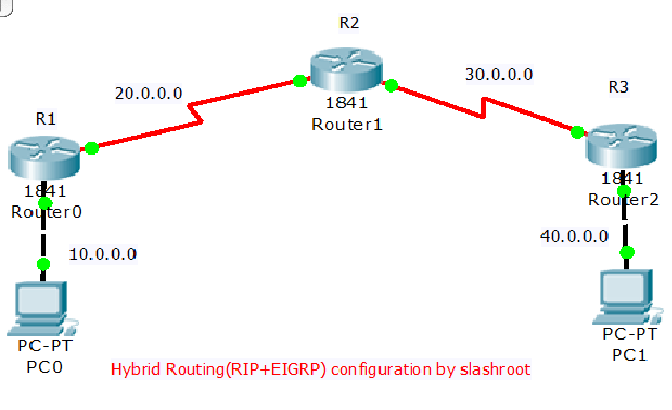
After static routing configuration, and dynamice routing configuration we are going to introduce Hybrid Routing Configuration here now. We will use RIP and EIGRP together and merge them to get the benefits of Distance vector and Link State. So when you use both RIP and EIGRP together then the most accurate metrics to determine the best path to destination automatically get changed with change in network topology.This type of routing is allowed for rapid convergence but consume less memory and lesser processing power.
This article is mainly concentrated on configuration of RIP and EIGRP together to get the above mentioned benefits.Now see the benefits of using this type of routing configuration.This type of configurational method is used when we want to inject all routes in EIGRP Autonomous system to RIP database and show up as a regular rip route, and not only this, but we can also inject routes from RIP to EIGRP topology Table using the same concept and then advertise these rip routes throughout the autonomous system as an EIGRP External Route.
Router>enableRouter#config terminalEnter configuration commands, one per line. End with CNTL/Z.R!(config)#hostname R1R1(config)#int fa0/0R1(config-if)#ip address 10.0.0.1 255.0.0.0R1(config-if)#no shutdown%LINK-5-CHANGED: Interface FastEthernet0/0, changed state to up%LINEPROTO-5-UPDOWN: Line protocol on Interface FastEthernet0/0, changed state to upR1(config-if)#exitR1(config)#int se0/0/0R1(config-if)#ip address 20.0.0.1 255.0.0.0R1(config-if)#clock rate 64000R1(config-if)#bandwidth 64R1(config-if)#no shutdown%LINK-5-CHANGED: Interface Serial0/0/0, changed state to downR1(config-if)#exitR1(config)#router ripR1(config-router)#version 2R1(config-router)#network 10.0.0.0R1(config-router)#network 20.0.0.0R1(config-router)#exitRouter>enableRouter#config terminalEnter configuration commands, one per line. End with CNTL/Z.Router(config)#hostname R2R2(config)#interface se0/0/0R2(config-if)#ip address 20.0.0.2 255.0.0.0R2(config-if)#bandwidth 64R2(config-if)#no shutdown%LINK-5-CHANGED: Interface Serial0/0/0, changed state to upR2(config-if)#exitR2(config)#router ripR2(config-router)#version 2R2(config-router)#network 20.0.0.0R2(config-router)#network 30.0.0.0R2(config-router)#exit.R2(config)#router eigrp 1R2(config-router)#network 20.0.0.0R2(config-router)#network 30.0.0.0R2(config-router)#exitR2(config)#R2(config)#interface se0/0/1R2(config-if)#ip address 30.0.0.1 255.0.0.0R2(config-if)#bandwidth 64R2(config-if)#clock rate 64000R2(config-if)#no shutdown
Router>enableRouter#config terminalEnter configuration commands, one per line. End with CNTL/Z.Router(config)#hostname R3R3(config)#int fastEthernet 0/0R3(config-if)#ip address 40.0.0.1 255.0.0.0R3(config-if)#no shutdown%LINK-5-CHANGED: Interface FastEthernet0/0, changed state to up%LINEPROTO-5-UPDOWN: Line protocol on Interface FastEthernet0/0, changed state to upR3(config-if)#exitR3(config)#int se0/0/0R3(config-if)#ip address 30.0.0.2 255.0.0.0R3(config-if)#bandwidth 64R3(config-if)#clock rate 64000R3(config-if)#no shutdown%LINK-5-CHANGED: Interface Serial0/0/0, changed state to upR3(config-if)#router ripR3(config-router)#version 2R3(config-router)#network 30.0.0.0R3(config-router)#network 40.0.0.0R3(config-router)#exitR3(config)#router eigrp 1R3(config-router)#network 30.0.0.0R3(config-router)#%DUAL-5-NBRCHANGE: IP-EIGRP 1: Neighbor 30.0.0.1 (Serial0/0/0) is up: new adjacencyR3(config-router)#network 40.0.0.0R3(config-router)#exitR1#show ip routeCodes: C - connected, S - static, I - IGRP, R - RIP, M - mobile, B - BGP D - EIGRP, EX - EIGRP external, O - OSPF, IA - OSPF inter area N1 - OSPF NSSA external type 1, N2 - OSPF NSSA external type 2 E1 - OSPF external type 1, E2 - OSPF external type 2, E - EGP i - IS-IS, L1 - IS-IS level-1, L2 - IS-IS level-2, ia - IS-IS inter area * - candidate default, U - per-user static route, o - ODR P - periodic downloaded static routeGateway of last resort is not setC 10.0.0.0/8 is directly connected, FastEthernet0/0C 20.0.0.0/8 is directly connected, Serial0/0/0R 30.0.0.0/8 [120/1] via 20.0.0.2, 00:00:12, Serial0/0/0R 40.0.0.0/8 [120/2] via 20.0.0.2, 00:00:12, Serial0/0/0R1#R2#show ip eigrp neighbors IP-EIGRP neighbors for process 1H Address Interface Hold Uptime SRTT RTO Q Seq (sec) (ms) Cnt Num0 30.0.0.2 Se0/0/1 13 00:30:07 40 1000 0 3R2#show ip eigrp traffic IP-EIGRP Traffic Statistics for process 1 Hellos sent/received: 835/416 Updates sent/received: 4/2 Queries sent/received: 0/0 Replies sent/received: 0/0 Acks sent/received: 2/3 Input queue high water mark 1, 0 drops SIA-Queries sent/received: 0/0 SIA-Replies sent/received: 0/0R2#show ip eigrp interfaces IP-EIGRP interfaces for process 1 Xmit Queue Mean Pacing Time Multicast PendingInterface Peers Un/Reliable SRTT Un/Reliable Flow Timer RoutesSe0/0/1 1 0/0 1236 0/10 0 0Se0/0/0 0 0/0 1236 0/10 0 0Today's Most Popular


Most Commented


 Sarath Pillai
 Satish Tiwary


Comments
Networking
Thank you so much for the configuration.
Add new comment